Cloaking for beginners
What cloaking is
Ad networks review your ads: a moderator or a bot opens the link and checks the page. Cloaking shows different pages to different visitors:
- safe page (white page) — a neutral page for bots, moderators, data-center and VPN traffic;
- money page — your real landing and offer for real people.
In Orbitra cloaking is a stream schema called Cloaking. One module makes the decision in all entry points (the campaign link, click.php, the Click API).
Cloaking violates the rules of most ad platforms and can lead to account and domain bans. You are responsible for how you use it. The same tool is also used honestly — for example, to keep scrapers and bots off a landing.
How Orbitra decides
Every visitor goes through two kinds of checks:
- Detection layers — signals that the visitor is not a regular person:
| Layer | What it catches | Needs |
|---|---|---|
| Datacenter / hosting | Visitors from servers and clouds (Amazon, Google Cloud, Hetzner…) — typical for review bots | ASN database |
| VPN / proxy | VPN, proxy and Tor exits | IP2Proxy PX12 database |
| Bot blocklists | IPs and User-Agents from ⚙ → Settings → Bots | — |
| UA heuristics | Crawlers and tools (facebookexternalhit, curl, headless browsers), an empty User-Agent, no browser language | — |
- Targeting filters — your audience. A visitor who is not in it gets the safe page: wrong country, wrong device type, or an ISP from the bot & datacenter ISP list.
Sensitivity sets how many signals are needed: Low — only a hard signal (a blocklist hit); Medium (default) — a hard signal or two soft ones; High — any single signal.
JavaScript check (off by default) adds one more step: the visitor first gets a tiny loading page, and only a browser that runs JavaScript moves on to the money page. Bots that do not run JS stay on the safe page. The price is one extra hop for everyone.
How to set it up
- Install the geo databases first. Without them the country filter sees everyone as Unknown and sends 100% of traffic to the safe page. The cloak card warns about missing databases. → Geo databases
- Open the campaign → Create Stream → Regular → schema Cloaking.
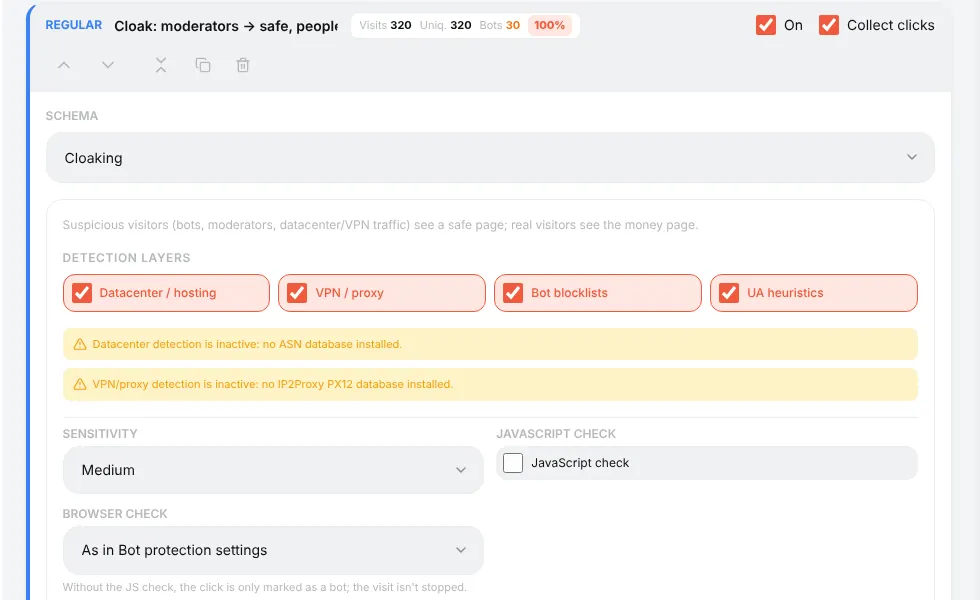
- Keep all four detection layers on and sensitivity Medium to start.
- Targeting filters: country (Allow
DE), device types (only Mobile if you buy mobile traffic), leave Block Bot & Datacenter ISPs on.
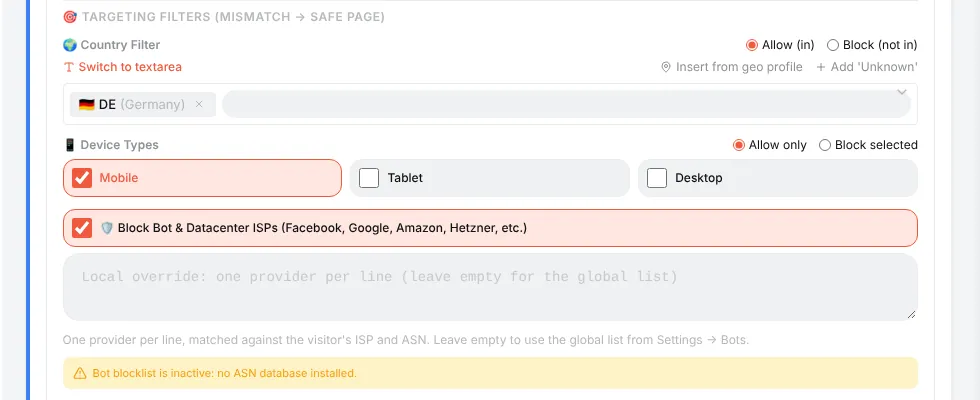
- Safe page — choose what moderators see: an External URL, one of your Tracker Landings, a Local Offer, or Inline HTML. Make it a believable, rule-abiding page on the same topic.
- Money page — exactly like the Landing + Offer schema: add landings and/or offers.
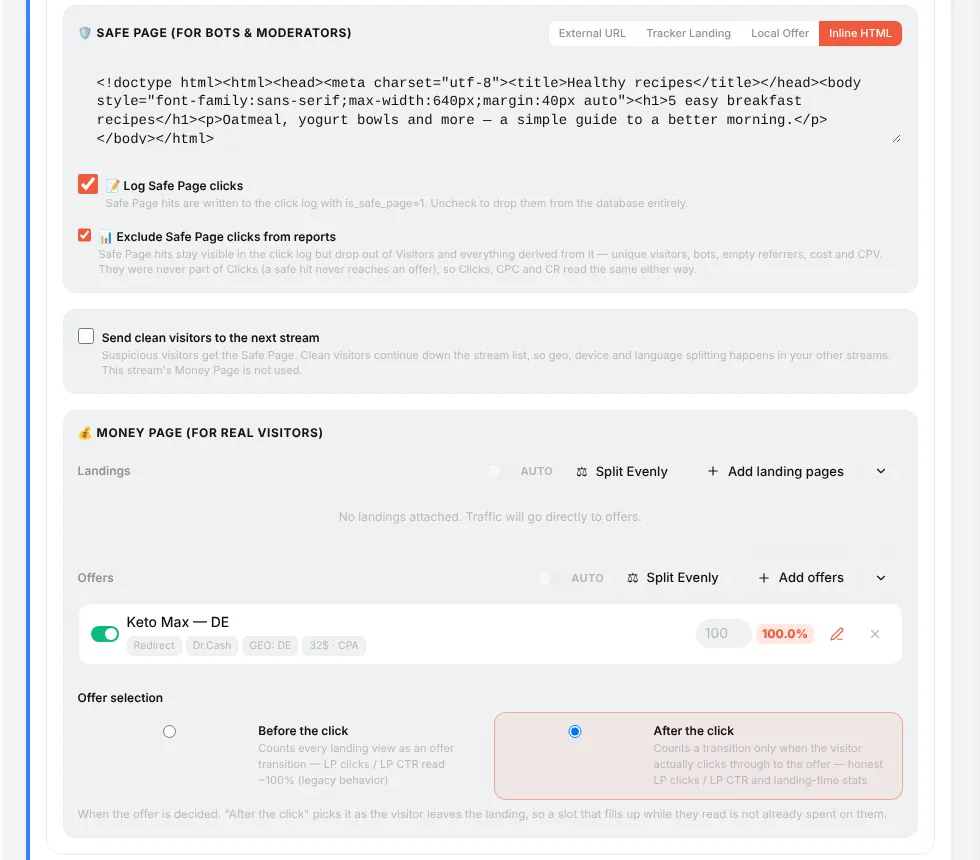
- Save, then test with the test link: open it from your phone in the target country — you should get the offer; open it from a desktop or with
&_geo=US— you should get the safe page.
The two report switches
- Log Safe Page clicks (on) — safe page hits are written to the click log, marked as safe. Turn it off and they are not stored at all (a counter still remembers how many there were).
- Exclude Safe Page clicks from reports (on) — safe hits stay in the click log but do not count in your campaign numbers, so moderators and bots do not dilute CR and cost per click.
"Send clean visitors to the next stream"
Tick it to use the cloak only as a gate: suspicious visitors get the safe page, clean visitors continue to your normal streams (by country, device…). Then the cloak stream must be intercepting (or first) so that every visitor passes through it.
Reading the results
The cloak card shows the hits for the chosen period — how many went to money and how many to safe — and the top reasons.
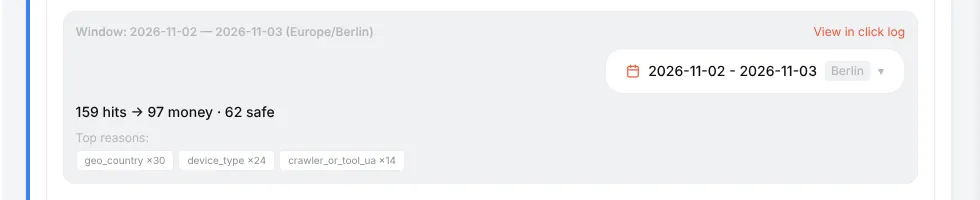
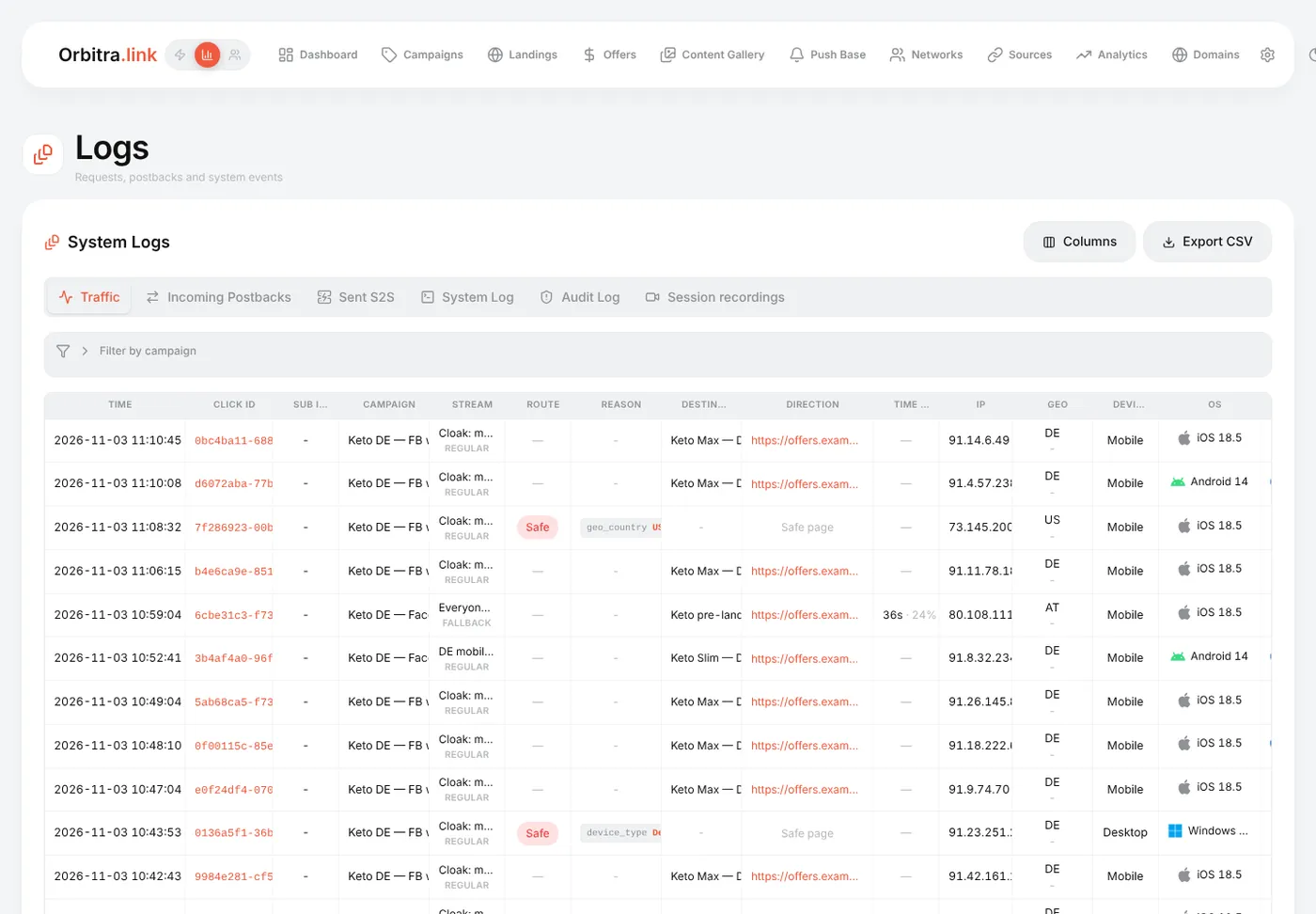
In ⚙ → Logs → Traffic the Route and Reason columns appear automatically: geo_country:US, device_type:Desktop, crawler_or_tool_ua:facebookexternalhit…
Common problems
| Problem | Fix |
|---|---|
| All traffic goes to the safe page | Geo database missing (reason geo_unknown), or the country/device list is too narrow |
Real mobile users get the safe page with reason ip2proxy_vpn_proxy | Many mobile carriers look like proxies — turn off the VPN/proxy layer |
| Moderators still reach the offer | Raise sensitivity, turn on the JavaScript check, add the browser check (⚙ → Settings → Bots) |
| The ad dashboard shows clicks, the tracker shows zero | Log Safe Page clicks is off, or everything is on the safe page |
Deeper reading: Cloaking, How the cloaker works, Browser check.
Beginner's guide: start here
A screen-by-screen tour of Orbitra: what the tracker does, the words you will meet, and the order to read the guides in.
Read guide →GuideYour first campaign, step by step
From a fresh install to a working campaign link and a test conversion: domain, network, offer, source, campaign, postback.
Read guide →GuideConnecting a domain
Add a domain, point DNS at the tracker, get a free SSL certificate, and what every switch on the Domains page does.
Read guide →GuideOffers and affiliate networks
How offers and networks are organized in Orbitra: templates, offer parameters and payout settings.
Read guide →GuidePostbacks: what to tell your affiliate manager
How conversions reach Orbitra: the postback URL, statuses, and what to copy-paste to your network.
Read guide →GuideStreams: how traffic is distributed
What a stream is, schemas, rotation and weights, and how Orbitra decides where a click goes.
Read guide →GuideStream filters
Country, device, ISP, bots and more: every filter explained with examples of common routing setups.
Read guide →GuideCloaking for beginners
Safe page vs money page, filter levels, sensitivity, and how to test your cloak before sending real traffic.
Read guide →GuideLanding pages
Host landings right in the tracker: landing types, the {offer} macro, the JS adapter and tracking pixels.
Read guide →GuidePWA apps
Build an installable PWA from a landing page: icon, screenshots, store listing and limits.
Read guide →GuidePush notifications to PWA users
Collect push subscribers from PWA landings and send them notifications — free re-engagement traffic.
Read guide →GuideContent Gallery
Store icons, screenshots and creatives in the tracker and reuse them across PWAs and landings.
Read guide →GuideCreatives and creative testing
Track which creative a click came from: subid routing, a test campaign and reading the report.
Read guide →